

AI models consume and produce a ton of data. From datasets to inference to output logs, the core loop of AI systems needs storage at each step:
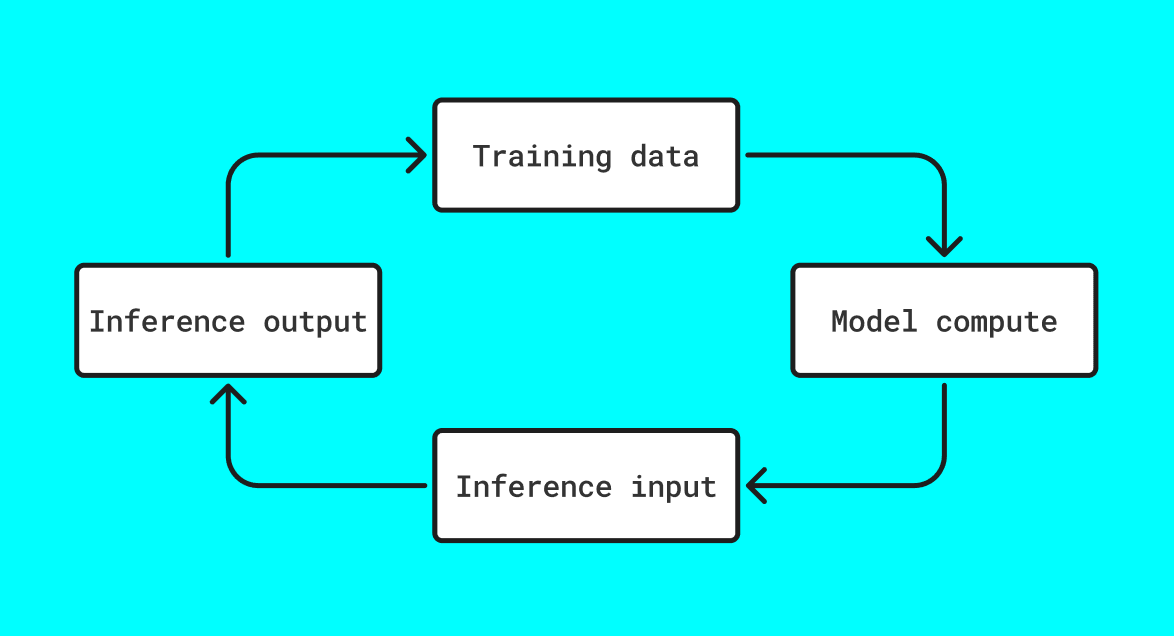
Dataset size can be fixed, but inference can be infinite.
Every model deployment is an infinite data factory, and the storage layer needs to enable scale, verifiability, reproducability, and provenance across the whole stack.
So why does Load help?
When you have systems that read/write at terabyte scale AND need persistence guarantees for valuable data, you need a smart way to route between cheap immutable bulk storage and permanence.
That’s what Load provides with xANS-104. The core flow is:
- ALL data gets packaged as ANS-104 DataItems — signed, tagged, timestamped and optionally encrypted
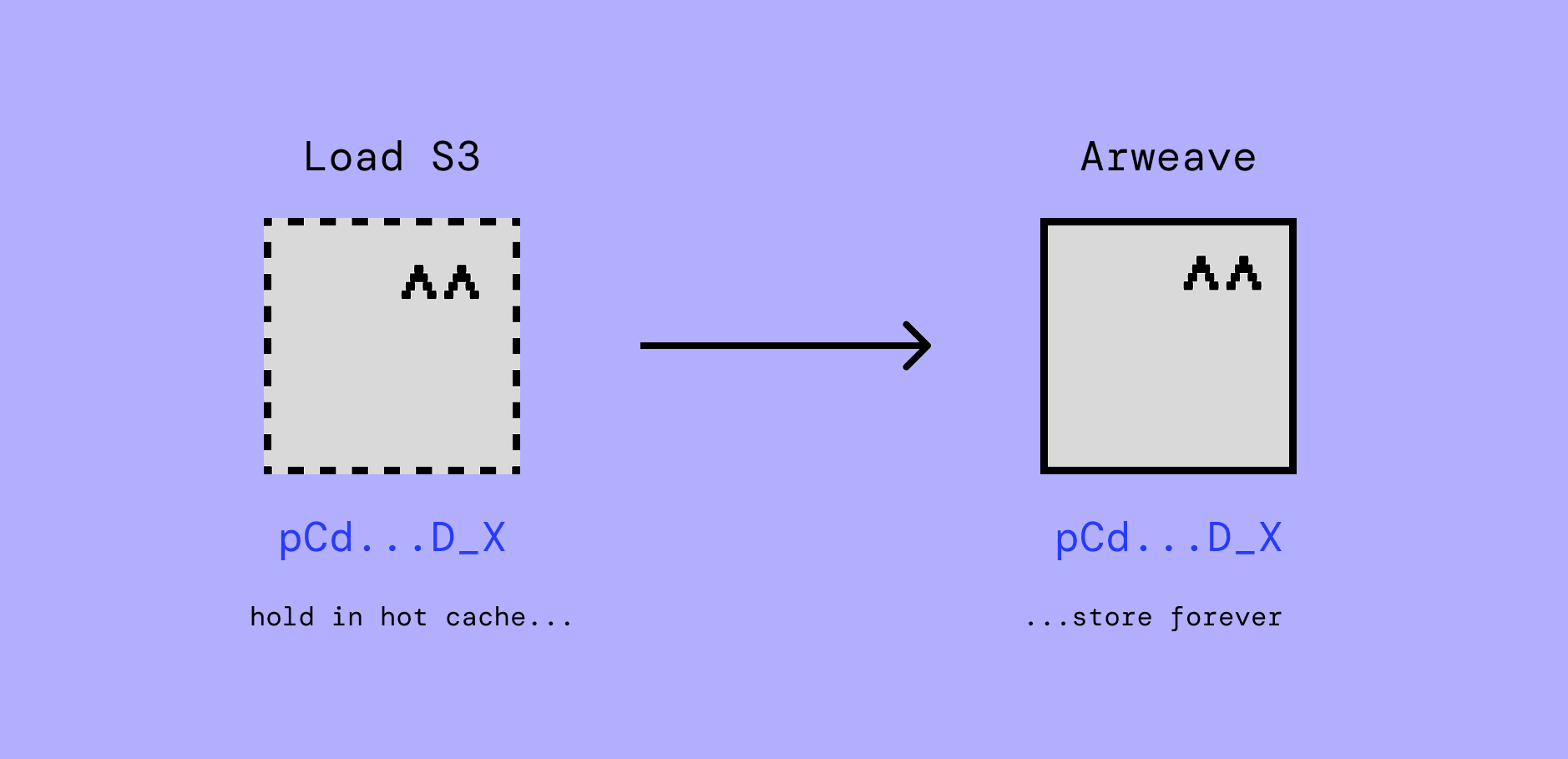
- DataItems get stored in the Load S3 hot cache for as long as necessary
- DataItems are either purged, renewed, or pushed to Arweave for permanent storage with the exact same txid as on Load S3, staying predictably referencable
The TL;DR on why this makes Load perfect for AI storage is that AI produces and consumes huge quantities of data but not all of it needs to be stored forever. Fixed data, like a version of a dataset, should probably be permanent. Ephemeral data like logs and input prompts may want to only be stored as long as the audit lifecycle. When data is created, it is not always clear whether the data is valuable or will become valuable.
But if it’s stored as an ANS-104 DataItem in Load S3, it can be anchored to Arweave in one command. This doesn’t create new data, it pushes the exact same data with the exact same and ID and provenance to permanent storage, meaning no new glue or infra.
Pricing
Let’s quickly compare pricing before diving into how to use it.
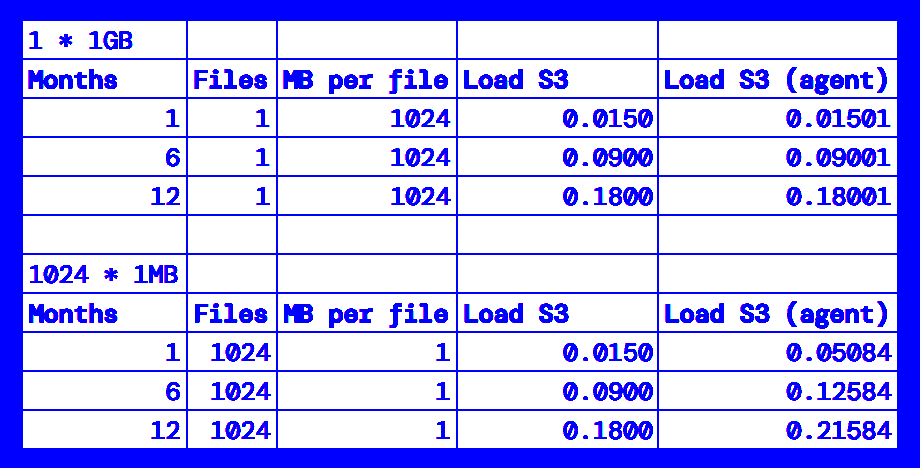
The base price of Load S3 storage is around ~35% cheaper than AWS S3, and up to 60% cheaper than Filecoin and 70% cheaper than Walrus.
We are currently running a grants program for selected partners, with 100GB of free storage - register here.
Now let’s look at how you get data in and out of Load S3.
Getting data in
It all ends up in the same place, but there are a few different ways to upload data, each with their own upsides and tradeoffs.
Use load-pools for existing datasets
If your system relies on training data that’s already published online, push it to Load with the load-pools CLI.
The load-pools CLI is purpose-built to import Hugging Face datasets and GitHub repositories to Load S3, neatly tagged and complete with provenance.
Hugging Face datasets can get taken down or silently updated, rugging you model and making past results impossible to replicate. GitHub repos run the same risk.
Pushing a dataset with load-pools uploads and freezes an immutable copy to Load S3 and makes it able to be queried back or made permanent on Arweave.

(Get $TOKEN from Load Cloud)
Get the CLI here, or read in full.
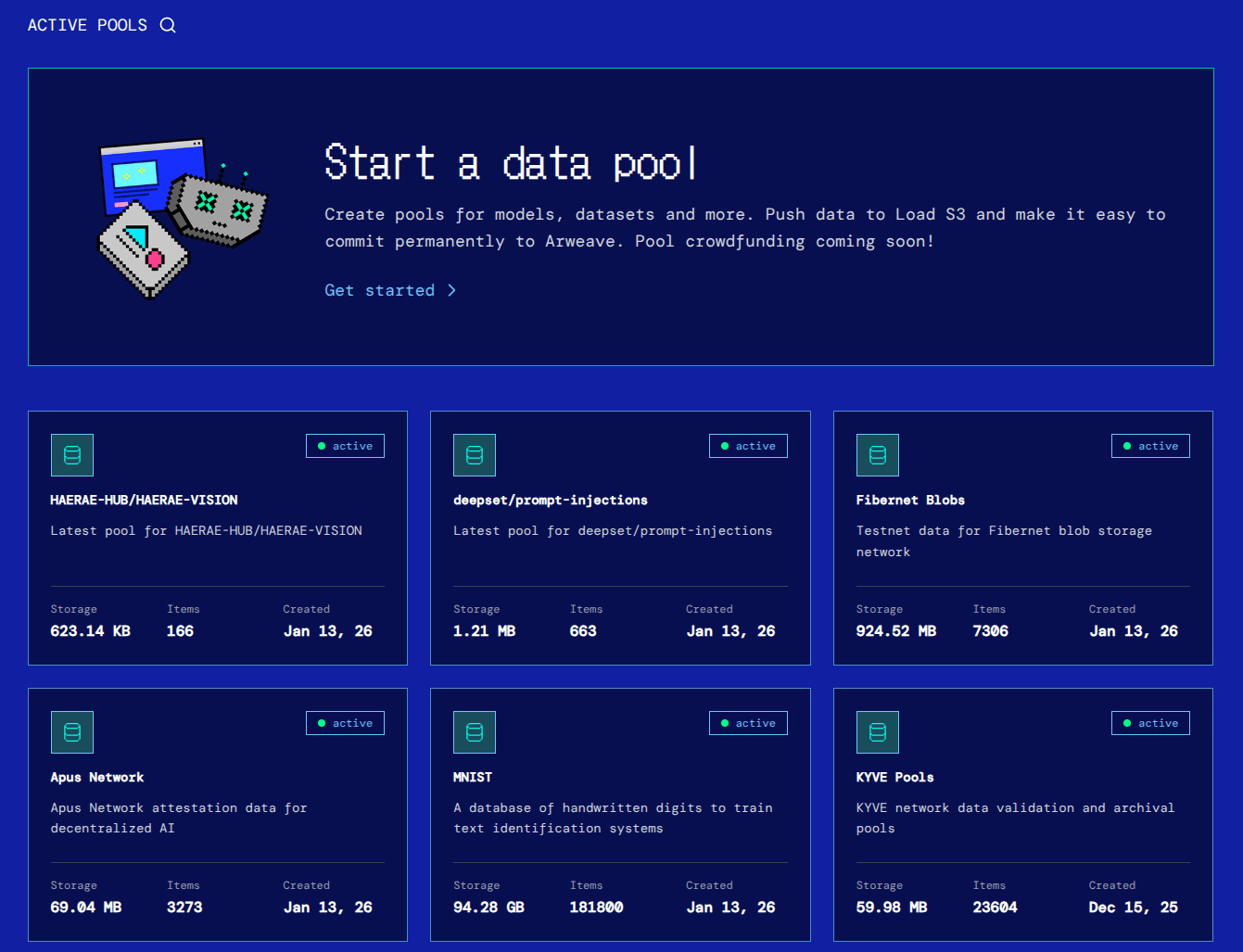
Here are a few of the public pools already stored and queryable:
Building with the Load S3 REST API (s3-agent)
For datasets there’s load-pools, but for building custom storage pipelines into your applications, you need the flexibility of a REST API — accessible from any programming environment, and just does a few things well. That’s s3-agent.
Here’s an example in JS:
async function storeInference(completionResult, apiKey) {
  const form = new FormData();
  form.append("file", new Blob([JSON.stringify(completionResult)], { type: "application/json" }));
  form.append("content_type", "application/json");
  form.append("tags", JSON.stringify([
    { key: "Data-Protocol", value: "AI-Inference-Log" },
    { key: "Model", value: completionResult.model },
    { key: "Request-Id", value: completionResult.id },
  ]));

  return fetch("https://load-s3-agent.load.network/upload", {
    method: "POST",
    headers: { Authorization: `Bearer ${apiKey}` },
    body: form,
  });
}
…and the same example in Rust:
async fn store_inference(completion_result: &CompletionResult, api_key: &str) -> anyhow::Result<()> {
    let tags = serde_json::to_string(&[
        ("Data-Protocol", "AI-Inference-Log"),
        ("Model", &completion_result.model),
        ("Request-Id", &completion_result.id),
    ])?;

    let form = reqwest::multipart::Form::new()
        .part("file", Part::bytes(serde_json::to_vec(completion_result)?)
            .file_name("inference.json")
            .mime_str("application/json")?)
        .text("content_type", "application/json")
        .text("tags", tags);

    reqwest::Client::new()
        .post("https://load-s3-agent.load.network/upload")
        .header("Authorization", format!("Bearer {api_key}"))
        .multipart(form)
        .send()
        .await?;

    Ok(())
}
The s3-agent returns a response like this with the dataitem_id:
{"custom_tags":[{"key":"Data-Protocol","value":"AI-Inference-Log"},{"key":"Model","value":"claude-sonnet-4-20250514"},{"key":"Request-Id","value":"msg_01XFDUDYJgAACzvnptvVoYEL"}],"dataitem_id":"6x34Tphcl_7140ry4S-ULRaHs6zGYGOhEUQReOA7r9E","message":"file uploaded successfully","offchain_provenance_proof":null,"owner":"2BBwe2pSXn_Tp-q_mHry0Obp88dc7L-eDIWx0_BUfD0","success":true,"target":null}You can resolve it from the gateway and check it on the explorer.
Data can be encrypted before upload even if its ‘container’ (the ANS-104 DataItem tags, signer, etc) is not and remains publicly queryable. This might be fine for many applications. If it isn’t a fit, there’s also a way to post DataItems to private S3 buckets and leave no public trace.
Load Cloud is a web app for creating and managing Load S3 buckets and API keys. To post data to a private bucket you have created in Load Cloud, just pass the right headers to the s3-agent call and make sure you use an API key that is scoped for access to the bucket:
  -H "x-bucket-name: $bucket_name" \
  -H "x-dataitem-name: $dataitem_name" \
  -H "x-folder-name": $folder_name"
Note: complete privacy comes with trade-offs — there is no query layer for private buckets, so you’ll need to maintain your own index if you want to surface data with more granularity than filename, folder name, bucket name.
Building with the AWS S3 SDK
If you already use AWS S3 for storage, Load’s S3 compatibility makes it simple to switch. Load S3’s endpoint is a drop-in replacement for the official AWS config, so you can keep the business logic and just change a few consts to switch.
import { S3Client } from "@aws-sdk/client-s3";

const endpoint = "https://api.load.network/s3"; // LS3 HyperBEAM cluster
const accessKeyId = "load_acc_YOUR_LCP_ACCESS_KEY"; // get yours from cloud.load.network
const secretAccessKey = "";

// Initialize the S3 client
const s3Client = new S3Client({
  region: "us-east-1",
  endpoint,
  credentials: {
    accessKeyId,
    secretAccessKey,
  },
  forcePathStyle: true, // required
});
Getting data out of Load S3
The same egress methods you’re used to with AWS S3 work 1:1 with Load S3, but for public data the s3-agent exposes a superfast query layer that can surface dataitem IDs by combination of tags.
Get all .png images from the MNIST dataset:
curl -X POST https://load-s3-agent.load.network/tags/query \
  -H "Content-Type: application/json" \
  -d '{
    "filters": [
      {
        "key": "Data-Protocol",
        "value": "MNIST"
      },
      {
        "key": "Content-Type",
        "value": "image/png"
      }
    ],
    "owner": "2BBwe2pSXn_Tp-q_mHry0Obp88dc7L-eDIWx0_BUfD0",
    "full_metadata": true
  }'
View this whole dataset on the explorer here too
All the resources you need to get started
This post points to a few tools and concepts that you can read more in-depth about on the blog and docs:
- xANS-104: cryptographically-signed and tagged data - temporary by default, permanent if valuable
- Load Pools CLI: upload entire Hugging Face and GitHub datasets to Load S3 in one command
- s3-agent docs: a REST API to upload and query signed ANS-104 DataItems to Load S3
- data.load.network: explore Load S3 data and pools of AI datasets
- Load S3 partner program: get 100GB/mo of Load S3 storage for free
Reach out on X at @useload for any help getting set up.