

Today marks a big new release milestone for the Load S3 Agent, enabling richer offchain dataitem querying, and offchain provenance records on Arweave.
Load S3 agent is a simple REST API to interact with Load S3 for public or private storage of ANS-104 dataitems. If you are a new reader, check out docs to learn more about the agent and Load S3 storage layer.
Timestamp Provenance
Before the v0.9.0 upgrade, LS3 dataitems stored in LS3 via the load-s3-agent had a quasi-complete provenance thanks to the ANS-104 data transaction format, more specifically, the dataitem owner and signature. The timestamp piece was missing, as the only available auditable timestamp was LS3’s S3 cluster timestamp - until now there has been no auditable and public proof that you created an offchain LS3 dataitem, without revealing its data content.
In today’s release, we introduced a simple optional field to the agent’s upload endpoint - offchain_provenance, if set to true, the agent will publish to Arweave the ID of the LS3 dataitem in the same upload process. Now Arweave (auditable public datalake) is aware of when you have created the public/private offchain LS3 dataitem, without revealing its content, owner or any other metadata.
The deterministic ID of the ANS-104 dataitem across permanent and offchain layers is proof that you have created an offchain dataitem, and it confirms (think of sealed timestamp provenance) once you anchor the offchain dataitem to Arweave.
(Source)
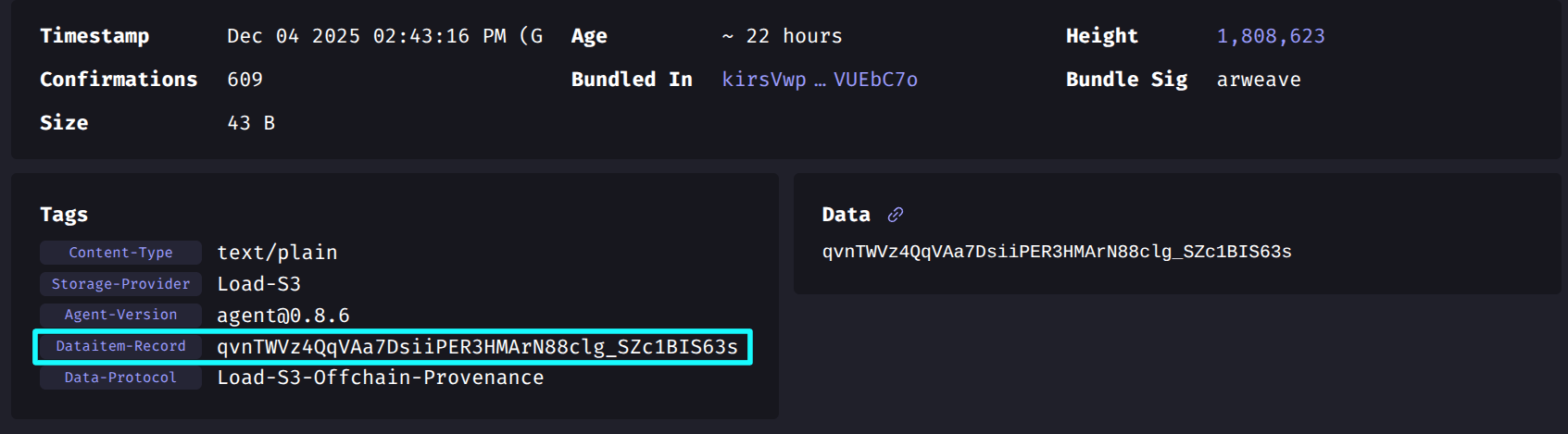
For each offchain LS3 dataitem the agent published an ANS-104 dataitem to Arweave with the following tags:
- Storage-Provider: Load-S3
- Agent-Version: ${VERSION}
- Dataitem-Record: ${OFFCHAIN_LS3_DATAITEM_ID}
- Data-Protocol: Load-S3-Offchain-Provenance
For example, the Arweave tx listed above is an onchain provenance record for the offchain LS3 dataitem: qvnTWVz4QqVAa7DsiiPER3HMArN88clg_SZc1BIS63s
Try it now:
echo -n "hello provenance world" | curl -X POST https://load-s3-agent.load.network/upload \
  -H "Authorization: Bearer $load_acc_api_key" \
  -H "offchain_provenance: true" \
  -F "file=@-;type=text/plain"
Richer GQL queries
Beside the timestamp provenance feature, we have shipped richer GQL query option for the agent’s GQL interface – and thanks to the Apus Network team’s feedback loop we shipped those new requested features:
full_metadata
The full_metadata flag, if provided and set to true it returns the full dataitems’ tags (and metadata) for the provided query
timestamp filtering
The second flag feature is the timestamp (ISO-8601/RFC3339 strings) filtering based on created_before / created_after fields
updated query response struct
Since v0.9.0, querying dataitems now return 2 helpful informative fields in each response: count which represents the items count in the response’s page - and the newer total_count which represents the full items count in the agent’s clickhouse matching the provided query (total_count >= count)
Try it today with Apus’s data pool
curl -X POST https://load-s3-agent.load.network/tags/query \
  -H "Content-Type: application/json" \
  -d '{
    "filters": [
      {
        "key": "Variant",
        "value": "apus.TN.1"
      }
    ],
    "full_metadata": true,
    "created_after": "2025-12-01T00:00:00Z",
    "created_before": "2025-12-05T00:00:00Z",
    "first": 25,
    "after": null
  }'
Load S3 Agent as a Rust library
And to wrap up this version release, from today it’s possible to use the load-s3-agent as Rust library in your stack, simply add it to your Cargo.toml:
[dependencies]
load-s3-agent = { git = "https://github.com/loadnetwork/lcp-uploader-api.git", branch = "main" }
And start using it in your projects like:
use load_s3_agent::create_dataitem;

fn build_item() -> anyhow::Result<()> {
    // ensure UPLOADER_JWK is available in the environment (or .env)
    std::env::set_var("UPLOADER_JWK", include_str!("../wallet.json"));

    let item = create_dataitem(
        b"hello world".to_vec(),
        "text/plain",
        &[("My-Tag".into(), "tag-value".into())],
    )?;

    println!("Signed data item id: {}", item.id());
    Ok(())
}
Technical Stack Improvement
Although this update is not directly relevant to the end users of the agents, recently we have migrated the agent’s Clickhouse instance to a locally hosted Clickhouse on our baremetal servers, ensuring no dependency on SaaS and broad scaling with no billing or outage worries :)
Try it
The agent’s v0.9.0 marks a closer step towards a stable production release, if you want to request a feature, report a bug or any issue, please reach out to us on X or Telegram! Meanwhile, don’t forget to check our docs!